
Time And History 2.4.0 for Jira Cloud is live on the Atlassian Marketplace. Where 2.3.0 added Transition Count, Between Statuses and scheduled email, 2.4.0 adds reach: the same five reports now run on any query you can write, keep the views you build, and appear on the ticket itself rather than only on a report page.
Five changes are worth a minute each, and one section at the end says what did not change, because a release post that only lists additions is half a release post.
Report scope: filter chips, JQL, or a Jira saved filter
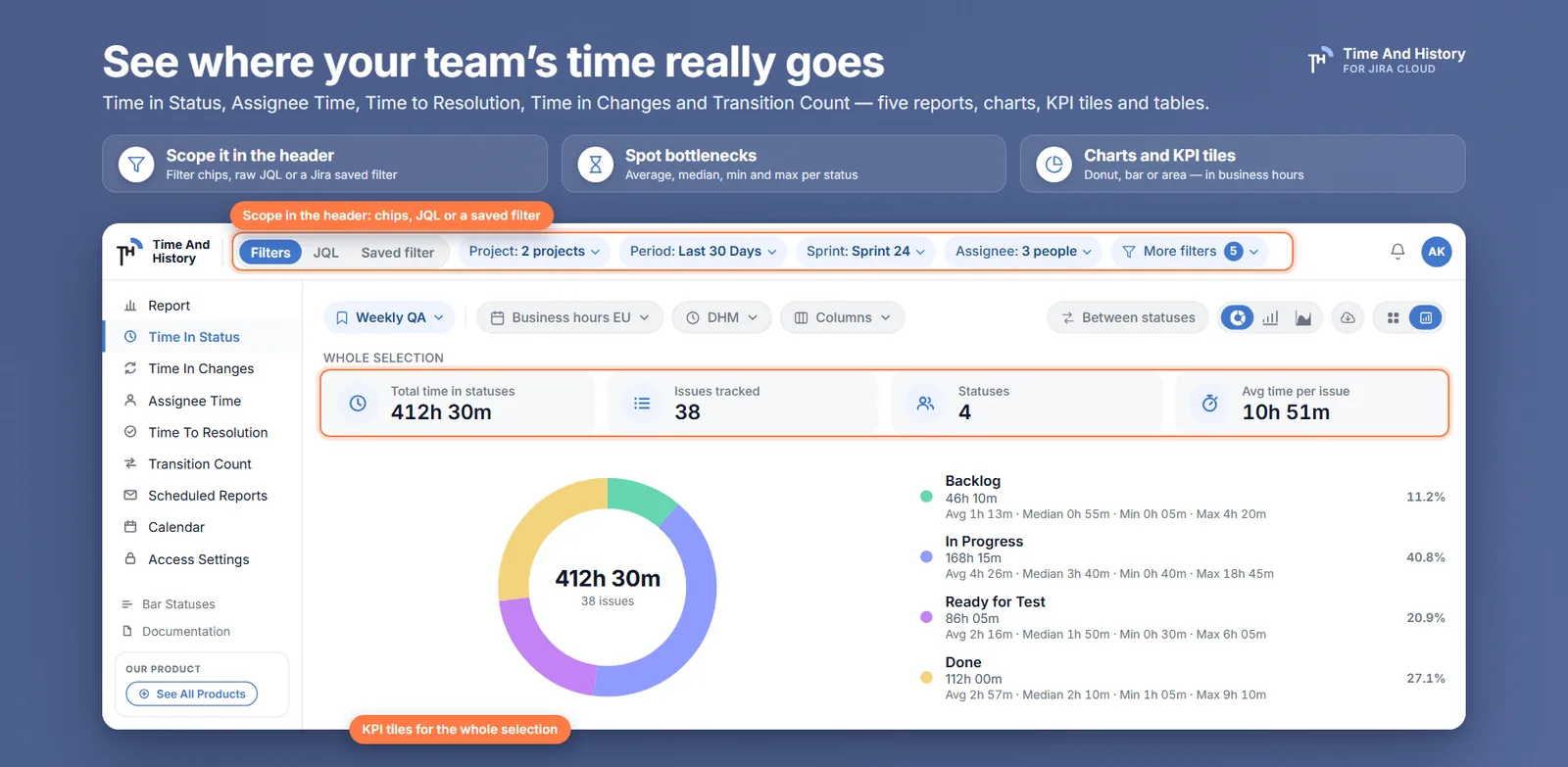
The report header now carries a Filters | JQL | Saved filter switch and nine filter chips — project (up to ten at once), period, sprint, assignee, issue type, epic, reporter, labels and components — with the rest folded into a More filters chip whose badge counts the chips behind it.
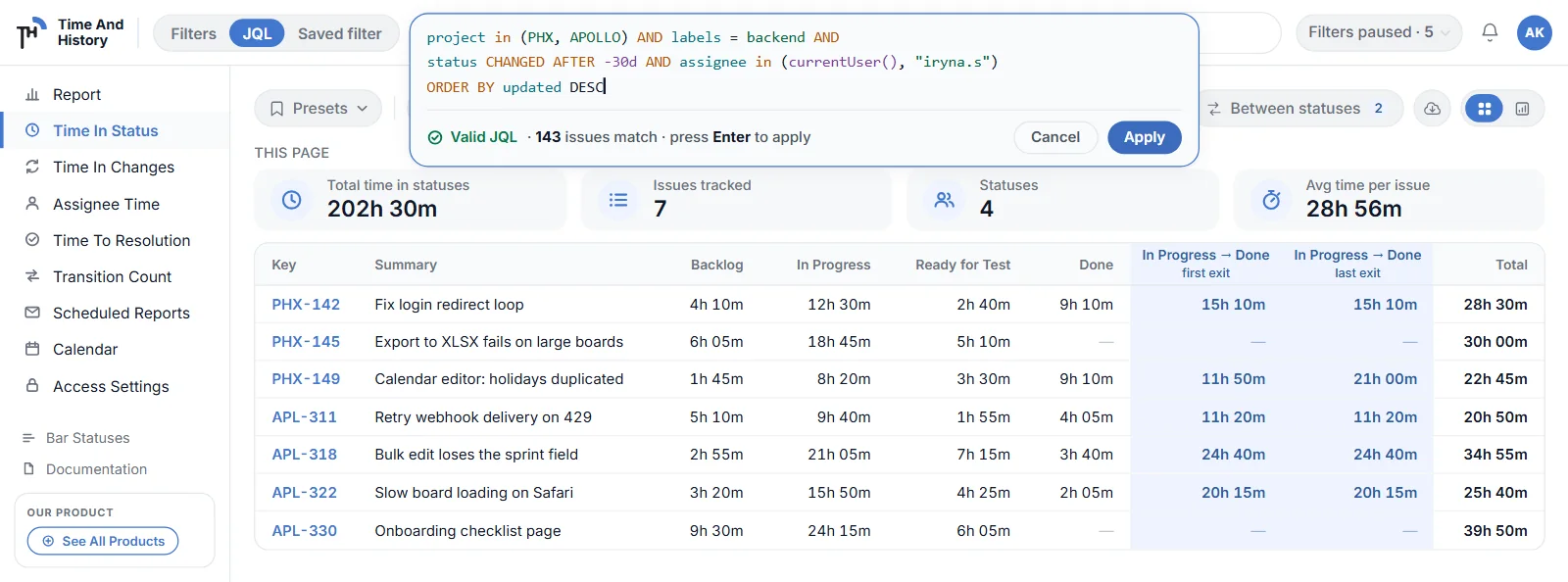
Switch to JQL and you get a real editor: syntax highlighting, up to 2 000 characters, a live count reading ✓ Valid JQL · 143 issues match before you apply, and Jira's own error message word for word when the query is wrong. Switch to Saved filter and you pick from your starred, owned and shared Jira filters, resolved as you, with the filter's JQL shown read-only beside the chip.
Your chips are not thrown away when you do this — they read Filters paused · N and come back exactly as they were. The period is paused with them, because in JQL and saved-filter modes the app sends Jira your query and nothing else, which is what keeps the editor's count and the table's row count in agreement.
Full walkthrough: Jira time in status by JQL or a saved filter. Docs: report scope.
Time in Status on the Jira issue view
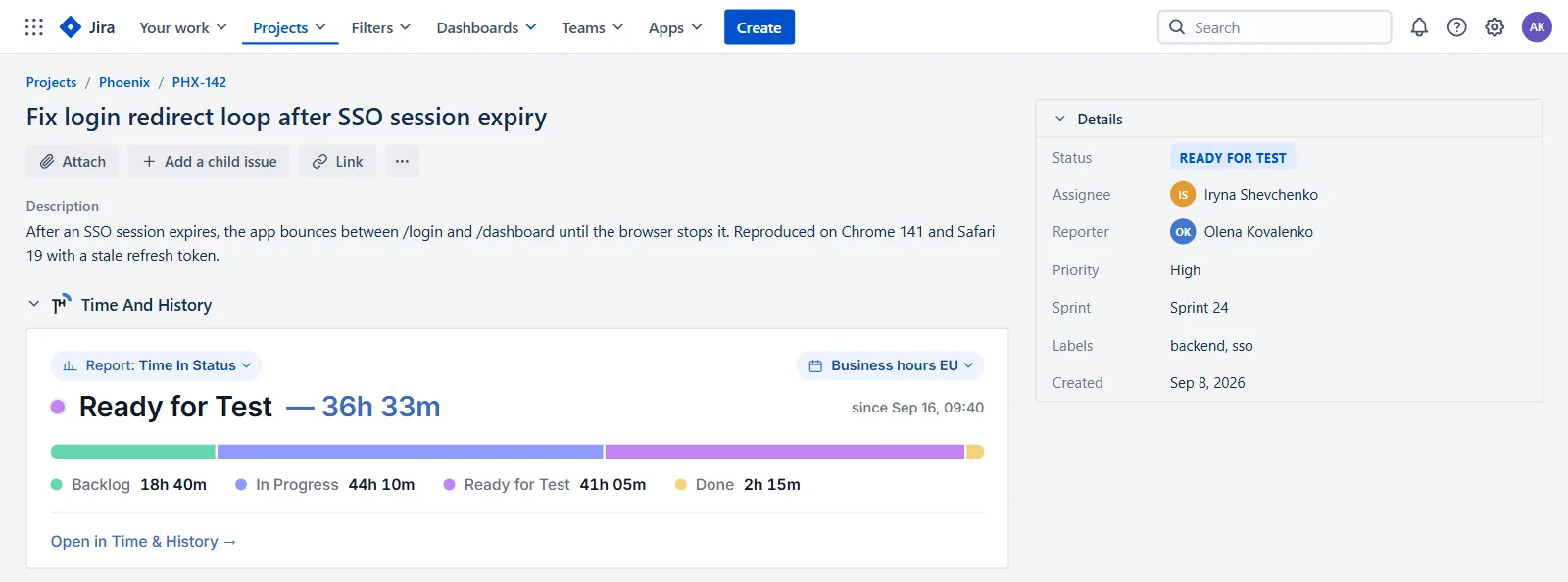
The one that removes a step from the day. Add the Time And History panel from an issue's Apps menu — per issue, for everyone who opens it — and it appears under the description: the current status with its open working time, a segmented bar and a legend of every status the issue has passed through, and a Report: chip that switches the same ticket between all five reports — Time in Status, Assignee Time, Time to Resolution, Time in Changes and Transition Count.
A calendar pill on the panel selects the work calendar, and it writes the same setting as the Working hours control on the report page, so the panel and the report cannot disagree. Open in Time & History → takes you to the full report scoped to that issue, which is usually the next thing you want.
It reads and never writes, it needs no new Jira permissions, and nobody is prompted to re-consent.
Full walkthrough: Jira time in status on the issue view. Docs: issue panel.
Presets: save a report view and bring it back in one click
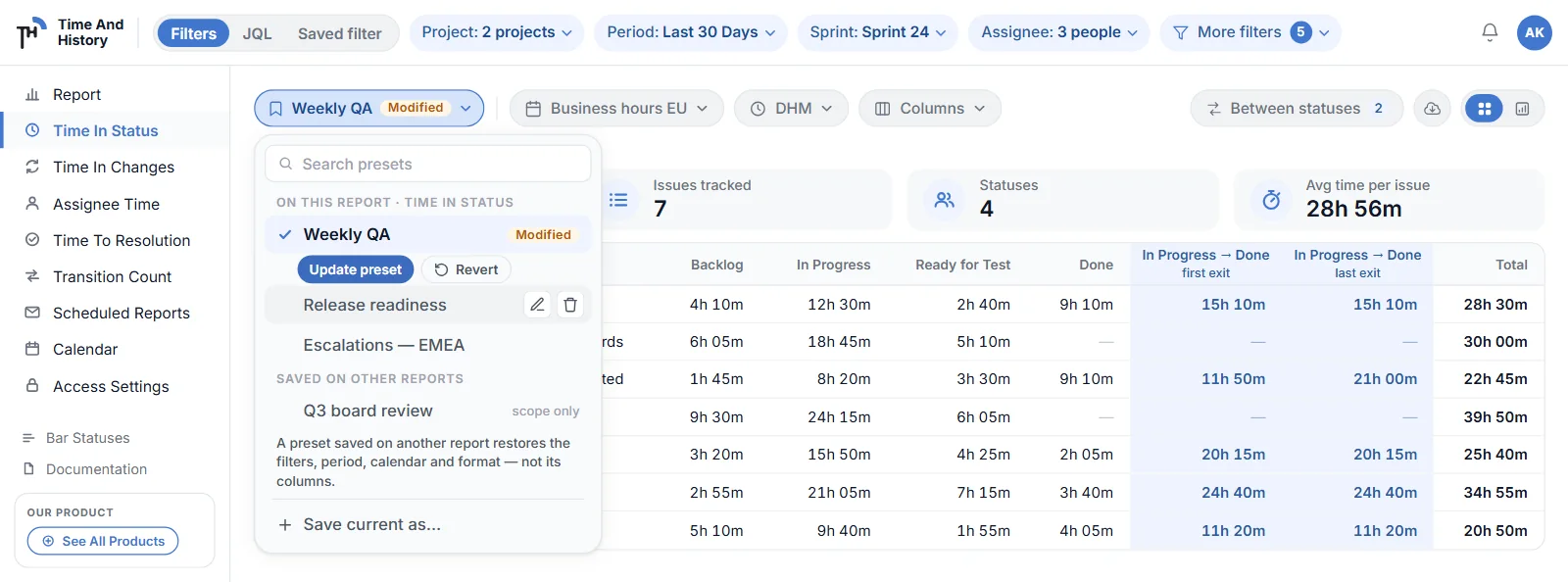
A preset is a named copy of the view you are looking at — the scope (chips, JQL or a saved filter), the period, the work calendar, the time format, and, on the report it was saved on, the columns and the Between Statuses pairs. Apply it and your view becomes that; change something afterwards and the pill shows Modified, with Update preset and Revert waiting underneath.
Fifty per person, names unique across your reports, sorted A to Z, grouped into on this report and saved on other reports. Presets are personal — they change nobody else's view — and a preset saved on a different report restores its scope only, which the menu says on the row before you click it.
Full walkthrough: save Jira report filters as a preset. Docs: presets.
Scheduled reports show their delivery
Scheduled email reports arrived in 2.3.0. The gap they left was silence: the schedule said success, and whether the ten recipients actually received anything was between their mail servers and nobody.
Now, when an address bounces or marks the report as spam, the recipient's avatar gets a red ring with the date and reason on hover, and the run gets a line beneath it — Not delivered to [email protected] (mailbox does not exist). A temporary bounce is labelled as temporary and the address keeps working. A run where some recipients got the file and others did not stays a success, with the undelivered addresses listed. And when every address on a schedule is blocked, the run fails and the schedule switches off with a sentence telling you exactly what to do.
A schedule can also be built from a preset now, and the list badges a row Preset changed since when the preset has moved on — so the email's provenance is on the row rather than in somebody's memory.
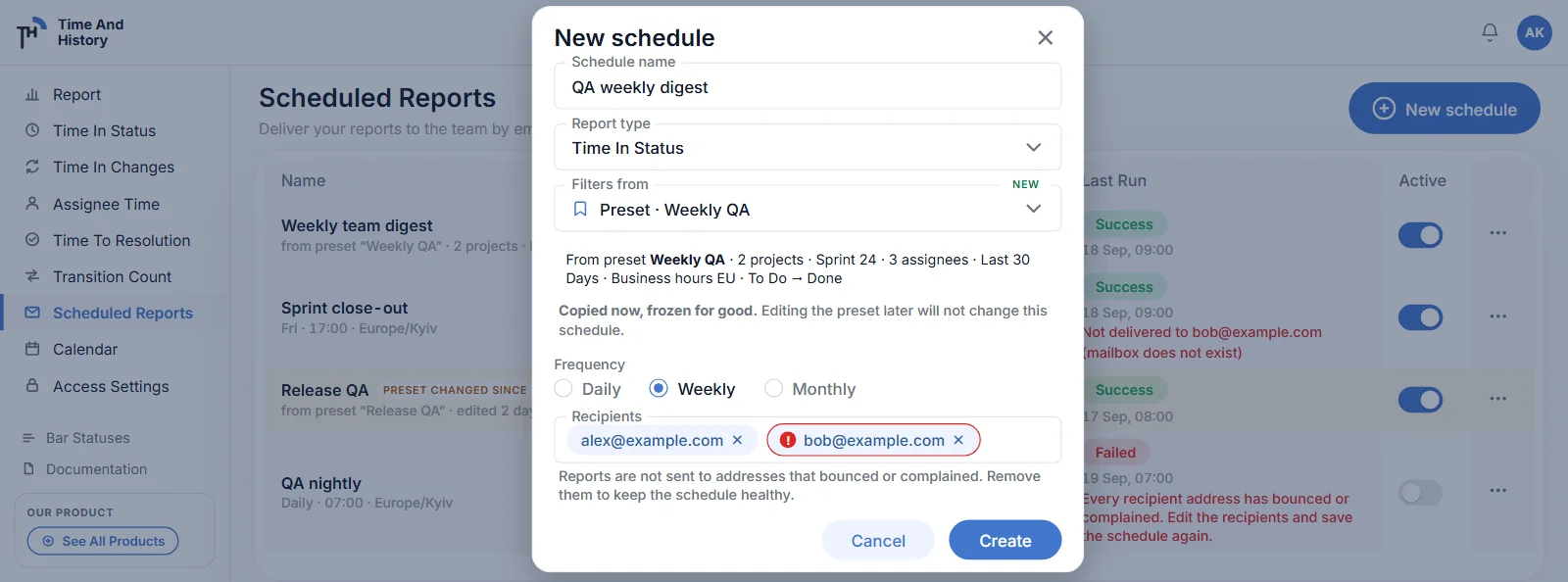
Full walkthrough: scheduled Jira reports by email, and knowing they arrived. Docs: delivery status.
Time in Changes counts custom fields
The Time in Changes report reads the issue changelog into a table: who changed what, when, from which value to which, and how long the previous value held. Until now it covered the standard fields. In 2.4.0 it also covers custom fields — Story Points and anything else Jira writes into the changelog — chosen through the History by Fields control.
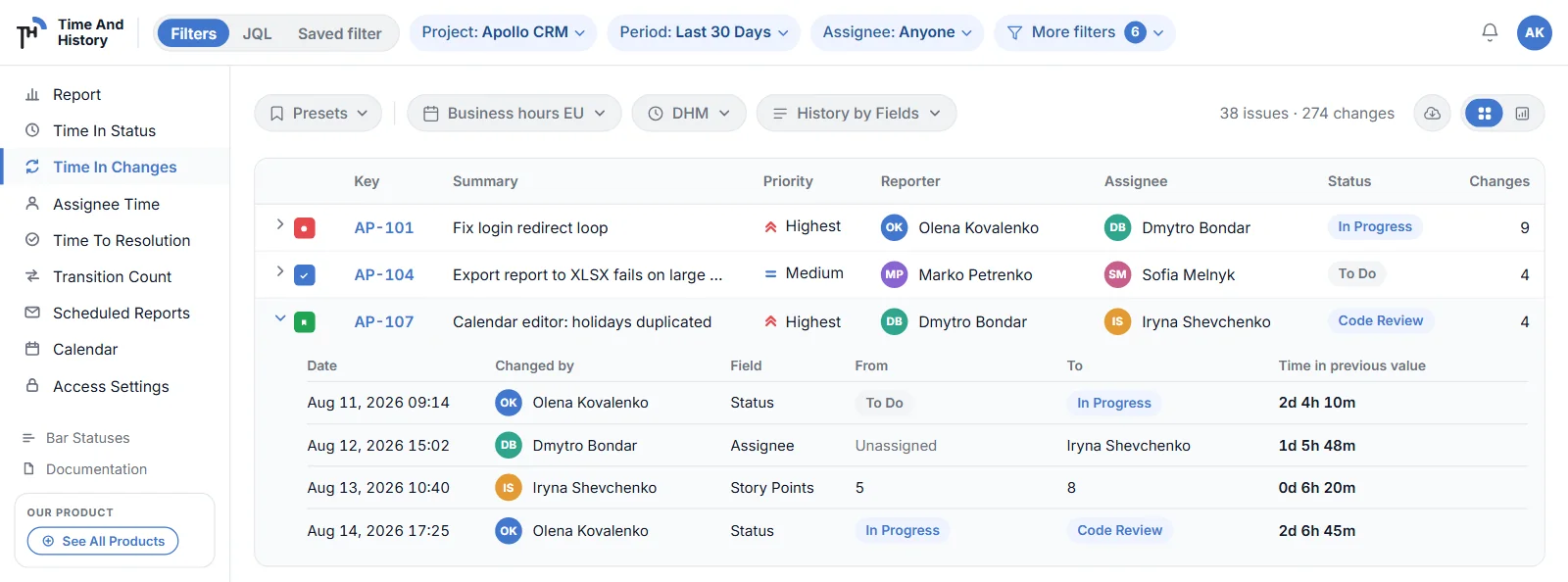
Full walkthrough: Jira custom field history — who changed Story Points, when, and for how long.
Fixed
- An issue that never moved now shows its creation status in the reports and on the panel, instead of an unknown one.
- Temporary Jira errors are retried rather than failing the request — a passing 502, 503 or 504 from Jira while the header loads its filter lists or counts a query no longer surfaces as an error.
What has not changed
Worth stating plainly, because every release note is an invitation to assume more than shipped.
- No new dashboard gadgets. There is no gadget for Between Statuses, and none for the new scope bar or presets. What the gadgets do is unchanged.
- Presets are personal. No shared or team-wide presets. To put a view in front of other people, export it or schedule it.
- A bounced address is never retried. The app reports the bounce; removing the address is the owner's call and the only remedy.
- The period is paused, not applied, in JQL and saved-filter modes. Write your dates into the query.
- The panel does not appear by itself — you add it from the issue's Apps menu, per issue, and everyone who opens that issue then sees it.
- Dark mode still follows Jira and there is no theme switch inside the app.
- Work calendars still have no breaks, and durations are still business days, hours, holidays and a time zone.
- No named cycle time or lead time metric. Between Statuses measures the working time between any two statuses you pick, with the loop rule printed in the column header. What you call that number is your team's business, not ours.
- Jira Cloud only.
Time And History 2.4.0 FAQ
What is new in Time And History 2.4.0?
Five things: a report scope switch with filter chips, raw JQL or one of your Jira saved filters; presets that save a report view under a name; a panel on the Jira issue view carrying all five reports for that issue; delivery status on scheduled email reports, so a bounce or a spam complaint is visible; and custom field support in Time in Changes, Story Points included.
Do I need to do anything to upgrade?
No. Marketplace apps update themselves, and nothing in 2.4.0 asks for new Jira permissions — the issue panel reads the same issue and changelog data the app already had, so nobody is prompted to re-consent. The one optional step is adding the panel from an issue's Apps menu — per issue, and it then shows for everyone who opens that issue.
Are there new dashboard gadgets in 2.4.0?
No. The dashboard gadgets did not change in 2.4.0 and still carry their own filters. Between Statuses, presets and the scope bar are report-page features.
Does 2.4.0 change pricing?
No. Time And History remains free for Jira sites with up to 10 users, with everything above included and no separate tier for the new features; larger sites are on the paid plan, which starts with a free trial. Checked 20 September 2026 — the Marketplace listing carries the current terms.
Try the one that matches your week
If you rebuild the same report every Monday, start with presets. If your standups keep asking how long a ticket has been where it is, add the issue panel. If your reporting question has ever needed the word except, start with JQL.
Install Time And History from the Atlassian Marketplace — free for up to 10 users, so the first team can try it without a purchase order. The documentation carries the full change list, and how a Time in Status report is calculated explains the numbers underneath all of it. Verified 20 September 2026.